Posted on

Programming Voltage on BMW MS41 | TRM Tuning

When flashing the BMW MS41 ECU Programming voltage is required. The most convenient way to provide programming voltage is directly from the 20‑pin diagnostic port under the hood. Rather than accessing the ECU harness or bench connector, this method uses a clean and reversible jumper inside the factory diagnostic port. It enables the TRM Flasher (or any compatible MS41 flashing tool) to communicate properly during programming.

Works For: BMW models equipped with the MS41 ECU (E36 328i, M3 S52, E39 528i, Z3 2.8, etc.)

🧰 What You’ll Need

  • A short piece of wire with stripped ends or small jumper clips
  • Basic hand tools to lift the diagnostic port cap and peel the rubber boot
  • Your TRM tuning or flashing setup ready to connect through the OBD port

⚙️ Step‑by‑Step Instructions

1️⃣ Locate the 20‑Pin Diagnostic Port

The port is found on the right (passenger) side of the engine bay, typically near the shock tower. Remove it from its clip and turn it over. You’ll also see a rubber boot at the base where the wires enter.

2️⃣ Peel Back the Boot

With gentle pressure, pull the boot back just enough to expose the **rear of the pins** and the color‑coded wires. This gives direct access to the wiring without bending terminals inside the connector.

3️⃣ Identify Pins 14 and 18

  • Pin 14 = Power supply (12 V)
  • Pin 18 = Programming voltage input to ECU

4️⃣ Create the Programming Voltage Jump

Use a small jumper wire to connect **pin 14** and **pin 18** together. This supplies the required programming voltage signal to the ECU, enabling write access for flashing software.

This jumper can be temporary (during flashing) or left in place permanently if you frequently tune or reflash your ECU. Many users choose to install a small wire or insulated vampire tap under the boot so the connection is hidden and weather‑protected once the boot is replaced.

5️⃣ Replace the Boot and Cap

After applying the jumper, slide the rubber boot back over the port to weather‑seal the connection. The **diagnostic cap** contains a small internal PCB that bridges communication to the interior OBD‑II port, so it must be installed whenever using the OBD port inside the car.

Tip: Performing the jumper on the back side of the 20‑pin connector allows you to tidy up the modification permanently while keeping a completely stock appearance from the top.

📈 Why This Method Works Best

  • Requires no ECU removal or bench harness
  • Safe, reversible, and OEM‑looking when restored
  • Ensures consistent programming voltage delivery during flashing

With this simple jumper in place, your MS41 ECU will enter programming mode reliably for flashing, logging, or recovery — ideal for TRM’s remote tuning workflow.

For additional technical support or to order TRM’s pre‑made flash cables, contact us at info@trmtuning.com.

Tags: TRM Tuning, BMW MS41, 20‑Pin Diagnostic Port, Programming Voltage Jump, ECU Flashing, E36, E39, BMW Diagnostics

Posted on

How to Log Your BMW Using VehiCAL Logger | TRM Tuning

VehiCAL Logger is an advanced data-logging tool for BMW ECUs, ideal for performance diagnostics, remote tuning, and calibration refinement. It allows TRM Tuning customers to collect precise engine data directly from the ECU and share it for custom tuning or troubleshooting. This guide covers how to install, configure, and use VehiCAL Logger for your BMW.

Supported Platforms: BMW E-series, F-series, and G-series with OBDII port access. Includes MSV70, MSD80/81/85, MEVD17, MG1/MD1, and others.

🧰 What You’ll Need

  • VehiCAL Logger software (Download here)
  • ENET cable or OpenPort (for F- and G-series BMWs) or K+DCAN cable (for older E-series)
  • Windows laptop (Windows 10 or 11, with .NET installed)
  • Stable laptop power or charger
  • TRM Tuning ECU calibration (if flashing/logging for tune refinement)

⚙️ Step 1: Install VehiCAL Logger

  1. Download the latest version of VehiCAL Logger.
  2. Run the installer and follow on-screen prompts.
  3. Connect your cable to the laptop — Windows will automatically install the drivers (verify in Device Manager under “Ports” or “Network Adapters”).

🔌 Step 2: Connect to the Vehicle

  1. Turn the car ignition to ON (do not start the engine yet).
  2. Plug in your ENET, OpenPort, or K+DCAN cable into the OBD port under the dashboard.
  3. Launch VehiCAL Logger.
  4. Select the correct interface (ENET for F/G series or K-line for E series) in the connection settings.
  5. Click “Connect” — the software should detect your ECU type (e.g., MSD85, MSV70, MEVD17, MG1, etc.).

Troubleshooting Tip: If the software doesn’t connect, check voltage (>12V), ignition status, and cable drivers. ENET users must disable Wi-Fi to ensure stable communication.

📋 Step 3: Choose Logging Parameters

  • Open the Parameter List tab.
  • Select metrics relevant to TRM tuning feedback, typically:
    • Engine RPM
    • Throttle Position (%)
    • Load / Torque Request
    • Boost (psi or bar)
    • Lambda / AFR
    • Ignition Advance
    • Knock Retard (if available)
    • Fuel Pressure
    • Timing Corrections (Bank 1/2)
  • For F- and G-series, you can also log transmission parameters: gear, shift timing, and torque targeting.

🚗 Step 4: Start Logging

  1. Click “Start Logging”.
  2. Perform a few controlled WOT (wide open throttle) runs from ~2000 RPM to redline in 3rd gear, or as directed by TRM support.
  3. After completing the run, click “Stop Logging”.
  4. The log will be saved automatically as a .csv or .log file in the VehiCAL folder (e.g., Documents\VehiCAL\Logs).

File Tip: Rename your log to include details like F10_N63_TRM_Log1.csv for easy identification before emailing to TRM.

📨 Step 5: Send Logs to TRM Tuning

Email your log file(s) to your TRM tuner with the following details:

  • Car model and ECU type (e.g., F10 550i / MSD85)
  • Fuel octane rating
  • Transmission type (auto/manual)
  • Any hardware changes (intake, injectors, turbo, etc.)

Send your logs to: info@trmtuning.com

✅ Step 6: Review and Tune Adjustment

TRM will analyze your VehiCAL logs and provide an updated calibration file if needed. Logging allows fine-tuning AFRs, boost targets, and ignition maps tailored specifically to your setup, ensuring peak performance and safe operation.

💡 Additional Notes

  • Always log with the engine at full operating temperature.
  • Ensure consistent environmental conditions when comparing logs.
  • Keep Windows laptop plugged in and disable screen savers during sessions.
  • For advanced users, VehiCAL also supports CAN frames for transmission and chassis data logging.

Using VehiCAL Logger with TRM Tuning gives you precise insights into your BMW’s performance and ensures your tune is perfectly dialed in for reliability and power.

Tags: TRM Tuning, VehiCAL Logger, BMW ECU Logging, Remote Tuning, BMW Data Log, ENET, K+DCAN, N63, B58, MEVD17, MG1, BMW Tuning Support

Posted on

How to Bench Flash a BMW F10 550i (MSD85) | TRM Tuning

The BMW F10 550i with the N63 engine uses the MSD85 ECU. For tuning or recovery procedures, this control unit must be flashed on the bench using TGFlash and a bench flashing harness with adapters. This guide walks you through connecting, powering, and flashing your ECU safely and correctly.

⚠️ Important: Always disconnect the ECU from the vehicle before bench flashing. Ensure 12V power is stable and never swap polarity. Incorrect wiring can permanently damage the ECU.

🧰 Tools and Equipment Required

  • TGFlash software (available from TRM Tuning)
  • TRM bench flash cable and adapter kit (for MSD85. available from TRM Tuning.)
  • 12V DC power supply (minimum 5A rated)
  • Windows laptop (Windows 10 or 11, with USB ports)
  • TRM-provided tuned file (.tgf) for MSD85

📦 Step 1: Identify and Prepare the ECU

  1. Remove the MSD85 ECU from the car. It is located in the DME enclosure near the passenger-side firewall (right side of engine bay).
  2. Clean and inspect the ECU connector pins — ensure there is no corrosion or moisture present.
  3. Place the ECU on a static-free bench with good lighting and airflow.

🔌 Step 2: Connect the Bench Harness

  1. Attach the bench flash adapter to the ECU’s connectors (Three from the bench harness).
  2. Connect the harness to your PC interface (OpenPort).
  3. Connect the 12V power supply leads and ground connection to the bench cable.
  4. Finally, plug your bench cable into your laptop’s USB port.

Power Check: The ECU should draw between 0.4A and 0.8A idle current on activation. Any higher may indicate incorrect wiring.

💻 Step 3: Launch TGFlash

  1. Open TGFlash on your laptop and click “Connect”.
  2. Select the ECU type: MSD85.
  3. Once connected, click “Read ECU” to make a full backup of your original file. Save it as F10_550i_VIN_Stock_Backup.tgfwhere VIN is the VIN of the car/ecu.
  4. email the file to info@trmtuning.com

🔥 Step 4: Flash the TRM Calibrated File

  1. Click “Write ECU”.
  2. Select your tuned file provided by TRM (e.g. TRM_MSD85_Stage1.tgf).
  3. Ensure the power supply stays stable above 12.2V throughout the process.
  4. TGFlash will display progress and confirm when the flash completes successfully.

⏱ Typical Flash Time: Read: 10–12 minutes | Write: 5–8 minutes

🚀 Step 5: Verify the Flash

  • After completion, click “Disconnect” and power down the setup.
  • Reinstall the ECU into the vehicle.
  • Reconnect all factory plugs securely and reconnect the battery.
  • Turn ignition ON and verify normal start-up.

💡 Tips for Safe Bench Flashing

  • Never hot-plug connectors while the ECU is powered.
  • Label your harness connections clearly before removal.
  • Disconnect power before plugging or unplugging cables.
  • Keep fan cooling or ventilation on long bench sessions.

Flashing the MSD85 via TGFlash ensures a stable and reliable update process while maintaining OEM safety layers. TRM’s calibrations offer proven gains in torque, throttle response, and efficiency when properly installed using the recommended bench setup.

Tags: TRM Tuning, TGFlash, MSD85, N63, BMW 550i, F10, ECU Flash, Bench Flash, BMW Bench Cable, Remote ECU Programming

Posted on

How to Flash Your E9x BMW with TRM Flasher | TRM Tuning

The TRM Flasher supports flashing for E9x/E6x BMWs equipped with N52, N54, and N55 engines, using ECUs such as MSV70, MSV80, MSD80, and MSD81. This includes the 325i, 328i, 330i, 335i, and 335is. Follow the steps below to safely read, back up, and write your TRM tune.

Important: Always use a stable power supply or battery charger during flashing. Voltage must remain above 12.0V. Do not open doors or cycle ignition during the write process.

🧰 What You’ll Need

  • TRM Flasher (download from trmtuning.com/downloads)
  • TRM Tuning calibration file (.enc2 or .bin)
  • K+DCAN cable
  • Windows laptop (Windows 10 or 11)
  • Battery charger or jump pack (recommended)

⚙️ Step 1: Install the TRM Flasher

  1. Download the latest version of TRM Flasher from trmtuning.com/downloads.
  2. Run the installer, allow Windows to trust the application if prompted, and complete the setup.
  3. Connect your cable and confirm detection.

📤 Step 2: Back Up Your ECU

  1. Turn ignition to ON position (accessory mode, engine off).
  2. Open TRM Flasher and click “Identify”.
  3. This will automatically detect the ECU type and should show you the VIN.
  4. Click “Backup” to create a backup file.
  5. Wait until the software confirms completion. This may take 10+ minutes.
  6. Save it as VIN_ECU_SW_NO_fullread.bin (the default file name generated by the tool.)

Video link: Using the TRM E9x Flasher to read MSV70/MSV80/MSD80/MSD81.

🔥 Step 3: Unlock your ECU

  1. Click “Flash” tab at the top.
  2. Click “Identify”.
  3. Click “Load BIN” and load your TRM Unlock file provided by email after your remote tuning purchase.
  4. Click “Open” and then “Yes” to unlock the ecu.
  5. Finally, Click “Flash Full”.
  6. Do not disconnect the cable or turn off ignition during this process.
  7. When complete, the flasher will confirm “Flashing full complete”.

🔥 Step 4: Flash Your TRM Tune

  1. Click “Flash” tab at the top.
  2. Click “Identify”.
  3. Click “Load BIN” and load your TRM calibration file provided by email after your remote tuning purchase.
  4. Click “Flash Tune”.
  5. Do not disconnect the cable or turn off ignition during this process.
  6. When complete, the flasher will confirm “Flashing tune complete”.

Video link: Using the TRM E9x Flasher to unlock and write MSV70/MSV80/MSD80/MSD81.

✅ Step 5: Post-Flash Check

  • Cycle ignition OFF for 15 seconds, then back to ON.
  • Start the engine and allow it to idle for 1–2 minutes.
  • Verify smooth idle and no warning lights.
  • If prompted, clear DTCs from the ECU using the TRM Flasher or any compatible scan tool.

🧪 Step 6: Optional Logging

Later E90 ECUs can record data directly using the TRM Flasher’s built-in logging mode or external tools such as MHD logger or INPA live data. For remote tune refinement, log these channels:

  • RPM
  • Load / Request Torque
  • Boost or MAP pressure
  • Throttle (%)
  • Lambdas / AFRs
  • Ignition timing
  • Knock correction

📨 Step 6: Send Data to TRM

Email your logs and ECU info to your TRM tuner for analysis:

Email: info@trmtuning.com

💡 Tips for Safe Flashing

  • Never flash with a low or unstable battery.
  • Disable all screen savers, sleep timers, and Windows updates during the process.
  • Switch off headlights, HVAC, and accessories to reduce current draw.
  • Always use the latest TRM Flasher build for compatibility and stability.

With TRM’s official flasher, you can reprogram your BMW’s ECU confidently — gaining the performance, smoothness, and reliability our tunes are known for worldwide.

Download TRM Flasher

Tags: TRM Tuning, TRM Flasher, BMW E90, N54, N55, N52, MSD80, MSD81, ECU Flash, BMW Tune, Remote ECU Programming

Posted on

How to Log BMW MS41, MS42, and MS43 ECUs | TRM Tuning

Logging your BMW’s ECU data is an essential part of remote tuning. If you’re running a TRM Tuning calibration on an MS41, MS42, or MS43 ECU, using RomRaider Logger will allow you to collect real-time engine information safely and accurately. These logs help our tuners fine-tune fuel, ignition, boost, and VANOS parameters for optimal performance. The TRM flasher will do some basic diagnostics and some logging on some ecus like MS41, but for a more complete log RomRaider is the go-to solution.

Download RomRaider: Get the latest version from the official site. Download RomRaider

🧰 What You’ll Need

  • RomRaider Logger (Windows version recommended)
  • BMW INPA/K+DCAN cable (FTDI-based USB cable)
  • Driver package (FTDI/INPA drivers installed)
  • Java Runtime Environment (JRE) – required for RomRaider, and must be 32 bit
  • Windows laptop and stable power supply
  • Your TRM-tuned ECU on MS41 (E36), MS42/MS43 (E46, E39, Z3)

⚙️ Step 1: Install and Configure RomRaider

  1. Download and install the latest RomRaider package.
  2. Install ECU definitions for **BMW MS41–MS43** — these allow RomRaider to recognize your ECU parameters. (Email info@trmtuning.com for the correct ECU definition for your ECU and calibration.)
  3. Connect your K+DCAN cable to the OBD-II port and open Device Manager. Note your COM port number (e.g., COM3).
  4. In RomRaider Logger → Preferences → Connection, enter your COM port and select 9600 or 115200 baud rate (We recommend **115200** for faster communication).

📋 Step 2: Select Logging Parameters

  • Open the **Logger** tab and click **Connect** once the ignition is ON (engine off).
  • Select key parameters:
    • Engine RPM
    • Throttle Position (%)
    • Load / MAF (g/s)
    • Lambda
    • Ignition Timing
    • STFT/LTFT (Fuel Trims)
    • Vehicle Speed
    • IAT
    • Coolant Temp
    • Knock
  • Check that live data displays correctly before recording.

🚗 Step 3: Perform the Logging Run

  1. Find a safe location such as a race track or dyno environment.
  2. Click “Record” in RomRaider Logger.
  3. Start with idle and part throttle driving. Make sure all parameters are within spec before continuing.
  4. Perform one to two wide-open throttle (WOT) pulls from ~2000 RPM to redline in 3rd gear.
  5. Let the car idle for one minute at the end of the log.
  6. Click Stop to end the session and save your .csv log file.

📨 Step 4: Send Logs to TRM Tuning

Email your saved log file to TRM:

Email: tuning@trmtuning.com

Include:

  • Your car model and ECU type (e.g., E46 330i MS43)
  • Fuel octane and any engine modifications (MAF, injectors, turbo, etc.)
  • Your .csv log file from RomRaider

✅ Step 5: Review and Adjustment

The TRM team will analyze your AFRs, fuel trims, timing, and load data to fine-tune your calibration. This step ensures your car runs safely while maximizing power and response.

💡 Logging Tips

  • Always log with a fully warmed-up engine.
  • Make sure your laptop is plugged in — RomRaider can crash on low battery voltage.
  • Keep your driver version consistent (FTDI 2.12.x recommended).
  • Use a battery charger if running multiple pulls during a session.

Accurate logs are the foundation of TRM’s remote tuning precision. By capturing quality data with RomRaider, you enable your tuner to optimize performance for your unique setup.

Posted on

How to Flash Your E36/E39/E46 with the TRM Flasher | TRM Tuning

How to Flash Your BMW Using the TRM Flasher

TRM Tuning makes it easy to flash your BMW’s ECU safely from home. Our free TRM Flasher software lets you read, back up, and write performance calibrations on supported BMW ECUs — including MS41, MS42, MS43, and MS45 systems — with the same precision we use in-house.

Download Now: Get the latest version of the TRM Flasher directly from our site. Download TRM Flasher

These instructions are for the MS41/MS42/MS43/MS45. The E9x and later platforms are similar but slightly different. See the appropriate pages for more information on those.

For the MS41 specifically we also need to provide programming voltage to the ECU to write. This is not needed for reading, but is required for flashing. Information on providing programming voltage for MS41 here.

🧰 What You’ll Need

  • TRM Tuning calibration file (.enc2 or .bin provided via email)
  • Free TRM Flasher software (Windows compatible)
  • K+DCAN or INPA-compatible USB cable
  • Windows laptop (Windows 10 or newer)
  • Battery charger or power supply (recommended)

🔧 Step 1: Install TRM Flasher

  1. Download TRM Flasher from trmtuning.com/downloads.
  2. Run the installer and follow the prompts.
  3. Connect your cable and confirm Windows recognizes it (you may need FTDI drivers).

📤 Step 2: Back Up Your ECU

  1. Turn ignition to ON (engine off).
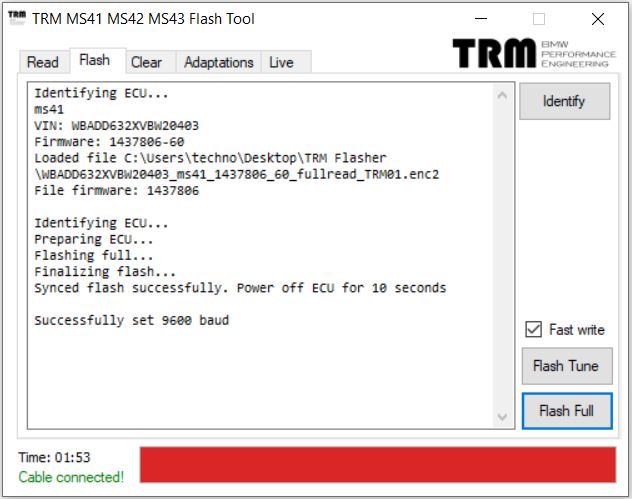
  2. Open TRM Flasher and select “Identify”.
  3. Click “Read Full”.
  4. Save your original file (e.g., Backup_Stock.bin).
  5. Keep this file safe — it’s your factory backup image.
  6. Email that file to info@trmtuning.com

Video link: Using the TRM MS41 MS41 MS43 flash tool to read an ecu.

🔥 Step 3: Flash Your TRM Tune

  1. If this is MS41 make sure you have programming voltage.
  2. Click “Flash” tab and click “Identify”.
  3. Click “Load Bin” to Load your TRM tune file provided after your purchase or tuning session.
  4. Click “Write Full” to begin flashing.
  5. Do not disconnect or power off during the write process.
  6. Wait for confirmation: “Write Complete.”

Video link: Using the TRM MS41 MS41 MS43 flash tool to write an ecu.

✅ Step 4: Verify the Flash

  • Start the engine and allow it to idle for several minutes.
  • Confirm smooth idle and throttle response.
  • Optional: log data and send it to TRM for analysis.

Tip: Always use a charger or power supply while flashing to maintain voltage stability.

🔍 Summary

Flashing your BMW ECU with TRM’s official tool ensures reliability, protection, and real performance gains. Every file is engineered, tested, and supported by the same team that powers TRM race cars.

Get TRM Flasher Now

Tags: BMW ECU Flash, TRM Tuning, TRM Flasher, BMW Performance, Remote Tuning, E46 Tune, E36 Turbo, MS43

Posted on

Oxygen sensors and lambda control

“Closed loop” refers to to the function of the system, meaning fueling is driven off of feedback from the oxygen sensor. Whether it is mathematically driven or table driven as the initial calculation for the amount of fuel needed, once we are closed loop, we are completely reliant on the data provided by the oxygen sensor for the final fueling value in the cylinder.

In many cases, idle and part throttle are where we learn the fuel trim that is applied globally.

The way we learn fuel trims is with our oxygen sensor. Commonly this is with a narrow band oxygen sensor. It does not directly measure lambda, but instead can report lean of lambda of 1, or rich of lambda of 1. Based on this, the ECU will jump back and forth across that line using feedback from the oxygen sensor. Starting from one side of that line, it adjusts an offset to base injection time to move in the opposite direction. It does so until it crosses the line, then it adjusts in the opposite direction in an effort to move across the line again. If we start rich of lambda of 1, it will trim lean until it crosses the line, at which point it will trim rich until it crosses the line again.
Clearly this is subject to the response rate of the O2 sensor. If we start out at lambda of 14.0 and start subtracting fuel, we cross the line at lambda of 14.7, but the ECU does not know this until the O2 sensor reports that it has crossed over that threshold. This can be anywhere from 15:1 to 18:1 AFR. Once it detects that it is over this line, it does the same in the “adding fuel” direction. Depending on rate of response, it can overshoot by quite a bit in that direction as well. The median of the swing range it is using it assumes is lambda of 1. This is still correct with both a narrow swing range and a wide swing range, even if the resulting drivability is poor when the system is extremely lean or extremely rich. We shoot for as narrow a range as possible as deviation from that mid point is inefficient. At cruise, we generally have a very tight/fast swing, and this is assisted by the rate of mass flow and the temperature.

If we have slow O2 response, such as added volume in the exhaust, cool exhaust temperature, inadequate O2 heater, etc we have a slower response, and thus a wider swing range.

With this hopefully how the system builds the fuel trim is more clear. Now if we look at this versus where we are in a fuel map, we can end up with sections of the map that are lean or rich from an ideal target, and how fast we go into or out of those regions will set how well the fuel trims do at correcting for this incorrect bit of the table.
If we have areas that are too far off, we can quickly get in trouble. For example, if we add fuel, say 20% to just the idle range, we can now learn a fuel trim that is -20%. We will end up exactly the same at idle within a few seconds, but now when we leave idle, we are now applying that -20% fuel correction, and if we go from idle at the staging line of a drag strip, we can now have a wide open throttle pass (which is open loop) that is 20% lean. This will also be the case in just driving around on the street, especially if we go to high throttle. Part throttle will be rich and will need to relearn the correct correction, and then when we get to idle the cycle repeats.

If you need more O2 heater control, or are using cheap sensors with weak heaters, or have excessive volume and heat loss between the cylinder head and the O2 sensor location, then you can end up with problems. If the wideband is picking this up cleanly, which is often the case as most wideband controllers have very good heater control, you may consider using a wideband with a simulated narrowband output to help keep the swing range smaller at idle and light part throttle where the stock narrowband may be outside of its ideal operating range in some applications.

Posted on

MS41 tuning done remotely with the TRM flasher/logger

We do a lot of our custom tuning remotely, often working with teams or shops as well as individuals. For tuning, we can fly to the car or the car can be sent to us, but we only need the car in person if we are needing to make physical changes that the end user cannot or doesn’t want to. Typically this is things like adjusting cam timing. We use our datalogger/flasher to make this process possible. The TRM flasher/logger can stay plugged in to the car and gathers engine data. With a wideband plugged in as well, we can see everything going on with the motor, make mechanical adjustment suggestions (noting intake or exhaust restrictions, resonance issues, or cam timing issues) and also make updates to the calibration (tune) and email that for the flasher/logger to flash into the ECU. This process allows for a higher level of involvement without the expense of physically bringing the car and tuner together. The level of data gathering is also higher than is typically available even with a tuner, car, and dyno in the same room.

Posted on

Heat, Energy, and Temperature

Defining terminology:
The total of all energy in an object is its internal energy.
Heat is not the energy the body contains but the energy transferred from one body to another.

We can make clear distinctions between temperature, heat, and internal energy.
Temperature is a measure of the average kinetic energy of the individual molecules.
Internal energy is the total energy of all of the molecules in the object.
Heat refers to the transfer of energy from one object to another due to a difference in temperature.

The heat required to change the temperature of a material is proportional to the mass of the material and the temperature change. (Commonly seen as Q = m*c*deltaT)

Posted on

Launch Control, antilag, and rev limiters

rev limiters, launch control, and antilag, are all different things.
Antilag is typically accomplished via combustion continuing into the exhaust manifold to spin the turbocharger, but without accelerating the engine. This can be at light part throttle or zero throttle by the driver, but the system will hang the throttle open slightly (or slightly more than standard target) and allow more mass flow through the turbo. it will also add more fuel and greatly delay ignition. The result is a lot of really hot exhaust gasses to spin the turbocharger. You usually do as little of this as possible, as this will melt almost any turbo charger and manifold. Usual best implementation is closed loop on turbine speed (and on a car with lots of cam control and DBW). Just enough energy to hold turbine speed target is the goal, as more will be excess heat/energy dumped into the components.
Launch control is a system to aid the driver in getting off the line more efficiently. This generally means minimizing wheelspin. This can be used in cases where traction control is illegal or otherwise unavailable, as most sanctioning bodies will let you ride preset torque or speed/acceleration targets as long as the system is not closed loop.
Rev limiters are a method of preventing overspeeding of the engine under its own power. This can be accomplished by cutting air, cutting fuel, or cutting ignition.